
Arcade Live
Sprocket's Fun Factory, LLCArcade
2.7155.00 Reviews
- Version
- 2.3.37
- Installs
- 50.00K
- Age Rating
- Everyone
Screenshots







Our Review of Arcade Live
 Analysis by Appyee
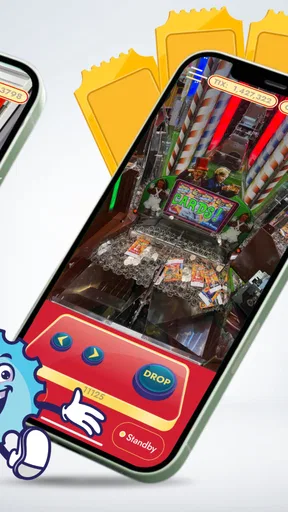
I tried Arcade Live with a simple question in mind: does a remote-played arcade game work well when one phone is being passed around at home? The answer is more nuanced than the cheerful “Arcade Live” label suggests. The game gives you access to live-action claw machines and coin pushers through your device, so the appeal is not just tapping a simulated cabinet. You are watching a physical arcade setup and trying to make a move from a distance.
That idea makes it interesting for a shared household. Someone can watch while another person plays, then swap turns without needing a television, console, or trip to a physical arcade. At the same time, it is not the kind of casual game I would install blindly for children or treat as an unlimited family activity. The live format, the in-app purchase range, and the app’s middling 2.7 average from around 255 ratings all suggest that expectations and spending boundaries matter.
How the live arcade format feels at home
The strongest part of the experience is the change in perspective. In a normal mobile claw-machine game, the prizes and machine behavior exist entirely inside software. Here, the attraction comes from interacting with a real remote arcade setup. That makes each attempt feel more like a small event, especially when two people are watching the same screen and discussing whether to aim for the edge, wait for a better opening, or try a different machine.
I can easily imagine using it during a quiet evening when one person is waiting for dinner to finish or when a family wants a short activity that does not require setting up a console. A parent might hold the phone while a child suggests the next move, or two adults might take turns with the same session. The viewing part matters: even when the player is not touching the controls, the physical machine gives everyone something to follow.
That shared quality separates it from many ordinary arcade downloads. A standard claw game is usually faster and more convenient because it removes the live element altogether. It may also offer clearer progression, repeatable practice, and fewer interruptions. Arcade Live is more appealing when the remote physical machine is the point, not when you simply want the most efficient way to play a claw game.
The coin-pusher side adds a different rhythm. Claw machines invite careful positioning, while coin pushers are more about timing and watching the pile develop. In a household setting, that difference can help prevent every turn from feeling identical. One person may prefer the deliberate aiming of the claw, while another enjoys the anticipation of a pusher. I would treat these as separate moods rather than assuming one mode will satisfy everyone equally.
Why passing the phone changes the experience
On a personal device, a short arcade attempt can feel private and disposable. On a shared device, every action becomes visible. That creates useful conversation, but it also makes mistakes more noticeable. If someone is still learning the controls, other players may rush them or criticize a failed grab. I found that the best household approach is to agree before starting that the player gets one uninterrupted attempt, while everyone else can offer suggestions only between turns.
This small rule is more important than it sounds. Remote controls and live video can make a move feel urgent, and a crowded room can lead to accidental taps or hurried decisions. Giving each player a clear turn makes the game feel fairer and reduces arguments over who was responsible for a missed opportunity.
There is also a practical trade-off: the app is easier to enjoy when the group is comfortable watching rather than demanding constant action. If your household wants rapid rounds with no waiting, a local arcade title will probably work better. If you enjoy the suspense of a physical machine and do not mind discussing the next move, this format has a distinctive charm.
Setting it up without blurring household boundaries
Arcade Live is free to download, which makes trying it straightforward. It is listed for Everyone and runs on Android devices using version 7.0 or later. Those details make it broadly accessible, but “Everyone” should not be mistaken for “no supervision needed.” The age label describes general content suitability; it does not decide whether a child should be allowed to make purchases or use an adult’s account.
Before handing over a shared phone, I would check the device’s purchase protections and decide who is allowed to start a paid transaction. The game includes in-app purchases ranging from $9.99 to $99.99 per item, so the difference between a free download and a free household activity is significant. I would not rely on a child’s understanding of the word “free” to cover the entire experience. A clear rule is safer: playing may be open to everyone in the home, while purchasing belongs only to the account holder.
This is especially important because a shared device can hide who initiated an action. If several family members use the same phone, an adult may later see a charge without immediately knowing whether it came from a child, a guest, or an accidental tap. I recommend keeping the device owner in the room for the first session and explaining which buttons are for ordinary play and which ones can lead toward spending.
I would also avoid presenting the app as a guaranteed way to obtain a particular prize. The enjoyment should come from the attempt and the live arcade spectacle, not from promising a child that a reward will definitely arrive. That conversation helps keep the activity grounded and prevents disappointment when a carefully planned move does not work.
A useful first-session routine
My preferred setup is simple. First, the account owner opens the game and looks through the available play flow. Next, the household agrees on whether the session is only for free access or whether any spending is allowed. Then everyone chooses an order and a time limit for the shared activity, without treating those limits as features built into the game.
That last distinction matters. I am describing household rules, not claiming that Arcade Live provides family controls, shared profiles, or a built-in timer. Those are decisions you make around the app. They are useful precisely because the game itself should not be assumed to manage family boundaries for you.
For a child using the app, I would keep the first session accompanied. That gives the adult a chance to see how the controls feel, how quickly the game moves from viewing to action, and whether the child understands that a failed attempt is part of the experience. It also avoids the common problem of a youngster taking the phone to another room and making decisions without anyone nearby.
For adults sharing a device, the setup concern is different. Decide whether the person holding the phone is playing on behalf of the group or whether each person is responsible for their own turn. That sounds obvious, but the distinction affects how you discuss purchases, outcomes, and responsibility. A shared screen does not automatically mean a shared account or shared ownership of anything earned.
Coordinating turns, timing, and expectations
Arcade Live works best when the group treats it like a small activity rather than background entertainment. I would choose one person to hold the phone and another to act as the spotter. The spotter can watch the machine and describe what is happening, while the player concentrates on the control. After the attempt, switch roles. This gives non-players a meaningful job without letting several people tap at once.
That arrangement also exposes one of the format’s weaknesses: remote play depends on everyone accepting that the player may need a moment to understand what is happening. A person watching the machine may think the correct move is obvious, while the person controlling it sees a different angle or timing. The group should avoid turning every attempt into a debate. A calm suggestion before the move is helpful; a stream of instructions during it usually is not.
I found that the best conversations focus on observation rather than certainty. Instead of saying, “That will definitely grab it,” say, “The opening looks clearer from the left.” This keeps the activity honest and makes the learning process more enjoyable. It is also a good way to include younger players without pretending that success is guaranteed.
For a household with several people, a written turn order can be surprisingly useful. It prevents the most confident player from taking over and gives quieter players a predictable chance. I would not make the order too rigid, though. If one person loses interest after watching a few attempts, let them step out and rejoin later. The app is better suited to flexible social play than to a serious tournament atmosphere.
When the live format is worth choosing
I would choose this game over a conventional arcade download in three situations. The first is when the physical machine is the attraction and the group wants to watch something unfold together. The second is when someone enjoys claw machines or coin pushers but cannot easily visit an arcade. The third is when you want a short shared activity that can happen on a phone rather than requiring a larger screen.
I would choose a conventional mobile arcade game instead when the priority is immediate replay. Simulated machines usually make it easier to retry quickly, practice the same situation, and understand the rules without waiting for a live setup. They are also a better fit for a child who wants uninterrupted solo play or for a commuter who has only a few spare minutes.
Arcade Live is therefore not automatically “better” than its alternatives. It offers a different kind of satisfaction. You trade some convenience and predictability for the feeling of interacting with a physical arcade environment from a distance. That trade is worthwhile only if the live element genuinely interests you.
The game’s reception should also temper expectations. It has passed 50,000 installs and has received around 155 written reviews, but its average rating remains modest. I would read that as a reason to approach it experimentally rather than assuming it will become a household favorite. Try a small, supervised session first and judge whether the live interaction feels engaging on your particular device and connection.
Age, trust, and the difference between playing and paying
The Everyone content rating makes the game approachable for mixed-age households, and that is useful for a family activity. Still, the more important question is not simply whether a child can understand the game. It is whether the adults have explained the boundaries around accounts, purchases, and expectations. A child may be perfectly capable of aiming a claw while still being too young to make a spending decision.
I would keep account ownership with the adult who manages the device and make that arrangement explicit. If children take turns, they should know that they are participating in the account holder’s session, not creating separate ownership by pressing the controls. This avoids confusion later, particularly if the household includes guests or siblings who assume that anything won during their turn belongs exclusively to them.
Trust also includes the emotional side of arcade play. A failed attempt can feel more frustrating when the machine is presented as real and the group is watching. I would frame each turn as an experiment: choose a position, observe the result, and decide whether the next move is worth making. That mindset is healthier than encouraging a child to keep trying simply because the previous attempt failed.
Adults should pay attention to how the app fits the child’s temperament. A patient child who enjoys watching and planning may find the experience fascinating. A child who becomes upset by uncertain outcomes or immediately asks for another paid attempt may be better served by a standard arcade game with clearly defined, non-purchase-based progression. The Everyone label does not remove that personal judgment.
For teenagers and adults, the same boundaries still matter, although the conversation can be more direct. Agree on a spending ceiling outside the app, decide who approves a purchase, and do not treat a successful result as evidence that the next attempt will work. Those rules preserve the social fun without allowing the live format to dictate the household’s budget.
What the app does not replace
This is not a substitute for a full local arcade visit. A physical venue offers atmosphere, multiple cabinets, shared movement around the room, and the simple pleasure of standing beside the machine. Arcade Live brings one part of that experience to a phone, but it cannot reproduce the entire outing. If your goal is a family day out, the app is better viewed as a convenient alternative for occasional play, not a complete replacement.
It is also not the ideal choice for someone seeking deep arcade mechanics. The appeal is tied to the live machines and the social suspense, not to complex character systems, long campaigns, or extensive skill trees. Players who want precise, repeatable challenges may prefer a traditional arcade title designed around fast feedback and consistent control.
Finally, I would not recommend making it the default entertainment option for every idle moment. Its strongest quality comes from attention: people watch, discuss, and take turns. If everyone is using it alone while ignoring one another, much of the reason to choose this format disappears.
My household verdict
Arcade Live is an unusual arcade game with a clear identity. Its remote live-action approach can turn a phone into a shared viewing activity, and the combination of claw machines and coin pushers gives a household more than one style of play. I especially like it for occasional group sessions where the fun comes from choosing moves together rather than rushing through endless attempts.
My recommendation comes with firm conditions. Keep the account holder involved, establish purchase rules before playing, and make sure children understand that the activity is not a promise of a particular prize. Because individual outcomes and enjoyment can vary, I would begin with a short supervised trial rather than committing money or assuming that the whole family will enjoy it.
The game is free, was released on December 26, 2023, and is currently listed as version 2.3.37 from Sprocket's Fun Factory, LLC. Those details make it easy to test on a compatible Android device, but they do not change the central decision: are you looking for a live arcade experience to share, or just a quick mobile game?
If you want a social, conversation-friendly activity and enjoy the novelty of controlling a physical machine remotely, I think it is worth trying. If you want instant retries, predictable progression, or a completely hands-off approach to purchases, a conventional arcade game will likely serve you better. For my household, I would keep Arcade Live as an occasional supervised activity—interesting enough to revisit, but not something I would leave open-ended on a shared device.
Verdict
Strengths of Arcade Live
- Live arcade matches create a lively, competitive atmosphere.
- Quick rounds make it easy to play during short breaks.
- A broad selection of arcade-style challenges adds variety.
- Real-time competition can make victories feel more rewarding.
- Simple controls help new players start without a long tutorial.
Limitations of Arcade Live
- Live gameplay may be affected by lag or unstable connections.
- Matchmaking quality can vary depending on the time of day.
- Frequent competition may feel stressful for casual players.
- Some features or content may require in-app purchases.
- Battery usage can increase during extended live sessions.
Similar Picks in This Category
View All
Subway Surfers
SYBO Games4.6

Stickman Party 234 MiniGames
PlayMax Game Studio4.6

Subway Princess Runner
Ivy4.4

Temple Run
Imangi Studios4.2

Zombie Tsunami
Mobigame SAS4.6

Stack Ball - Crash Platforms
CASUAL AZUR GAMES4.5
Frequently Asked Questions
What is Arcade Live, and what can I do with it?
Arcade Live is an entertainment-focused app centered on arcade-style gaming and interactive live content. Depending on the version available in your region, you may be able to discover games, watch live sessions, follow creators, participate in community activities, and interact with other users. The exact catalog and features can change over time, so checking the current store description is recommended before downloading.
Is Arcade Live free to download and use?
Arcade Live may be free to download, but some features, games, virtual items, subscriptions, or premium content can require payment. Before using any purchase option, review the pricing, renewal terms, and refund policy shown in the app store or inside the application. Parents should also check whether the app allows in-app purchases and configure device restrictions when necessary.
Does Arcade Live require an account or an internet connection?
Many of Arcade Live’s social, streaming, multiplayer, and community features are likely to require an internet connection and may also ask you to create or link an account. Some content could be available without signing in, but offline access may be limited. A stable Wi-Fi or mobile-data connection is recommended, especially when watching live content or playing online games.
Is Arcade Live safe for children and teenagers?
Arcade Live may include user-generated content, live interactions, chat, advertising, or in-app purchases, meaning the experience can vary depending on the community and available content. Parents should review the app’s age rating, privacy settings, chat controls, and purchase options before allowing children to use it. Supervision is advisable whenever live or social features are enabled.
What permissions and privacy information should I review before installing Arcade Live?
Before installing Arcade Live, review the permissions requested by the app, such as notifications, microphone, camera, storage, or account-related access. Some permissions may support live broadcasting, communication, or personalization, while others may be optional. Read the developer’s privacy policy to understand how data is collected, used, shared, and deleted, and disable permissions that are not necessary for your intended use.
Play our best games!


